

Pastel Punch is our 44th Season! Here are some more details, tips and tricks for the week 4 tasks.
Click here for the daily and week 1 tasks. Click here for the week 2 tasks. Click here for the week 3 tasks.
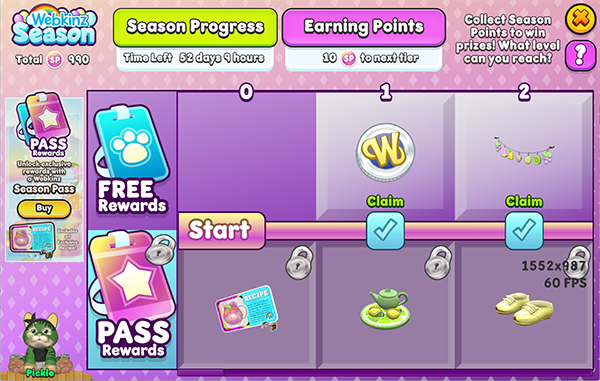
Week 4
- Catch the super fast Bee!
- Earn 50 Prize Tickets at the Arcade
- Feed your pet a Market Fresh Berry Pie
- Earn 100 KinzCash playing Lily Padz
- Collect the Material Box 3 times
- Fill a Pet Care Heart 5 times
- Buy something from the Wish Boutique
- Purchase something from the Spirit Shop OR the Skill Shop at the Kinzville Academy
- Craft any recipe on the Carpenter’s Bench
- Have your baby or kid return from Daycare
Catch the super fast Bee!
Look for the floating bee that zips across your screen. Tap on it to complete the task.
Earn 50 Prize Tickets at the Arcade
Head to the Arcade and play as many games as you need to earn 50 Prize Tickets. Free accounts have 3 free plays, while full members get 6 free plays. Use Play Tokens to keep playing your favorite games. Play Tokens can be purchased from the Arcade Shop using Prize Tickets.
Feed your pet a Market Fresh Berry Pie
If you have a Market Fresh Berry Pie in your dock, you can complete this right away. Otherwise, visit the Farmer’s Market on Tuesdays, Thursdays, and Sundays from 6am to 11pm KinzTime and purchase one from Will’s Pantry to feed to your pet.
Earn 100 KinzCash playing Lily Padz
Head to the Arcade and tap on any Arcade unit. Select Lily Padz from the list and play as many games as you need to earn 150 KinzCash.
Collect the Material Box 3 times
Head to Kinzville and look for the vending machine just outside of the Curio Shop. Tap on it once a day to get a Material Pick Pack. Do this on three different days to complete this task.
Fill a Pet Care Heart 5 times
Complete your pet’s request to fill their hearts. Once an hour, you can also exercise your pet, feed it if it is below 50, take a photo at the photo booth or craft something to earn additional pet care points. You can fill the same pet’s heart on five different days, or five different pets — or any combination.
Buy something from the Wish Boutique
Head to the Curio Shop and tap on the register at the back right. Choose something to purchase using Wish Tokens. There is no minimum amount that you need to spend.
Purchase something from the Spirit Shop OR the Skill Shop at the Kinzville Academy
Visit the Kinzville Academy and purchase something from either shop. No minimum Ribbon amount needed to spend.
Craft any recipe on the Carpenter’s Bench
Tap on any Carpenter’s Bench and choose a recipe to craft to complete this task. If you’re an avid gardener and have saved up clay, bricks are the easiest things to craft.
Have your baby or kid return from Daycare
Send your baby or kid to Daycare. The task will complete when they come back.
Download Webkinz Next now — available for iOS, MacOS, Android and Windows 10.



Follow Webkinz on social media:
social media








For the Week 5 challenge tasks, one doesn’t work. Bouncing in the Bouncy House at the Farmer’s Market does not register as being completed, even after letting my pet jump for a full five minutes. Please fix this as soon as possible, because the season is almost over. Thanks! =^o^=
Came to verify this. Bouncy House is not registering.
I am glad you all posted this. I tried in the morning logged out and back in and tried again, no luck. I even tried in the evening and it still did not work. Hopefully they are fixing this today.
another day I can’t do webkinz next, Now instead of telling me I need to upgrade, it opens to my home, but is “stuck”. I can’t see my pet and if I try to go anywhere at my home, nothing happens. If I try to go to arcade, it starts loading but never completes to get me there. this is using a Mac.
thank you for fixing, It is working again today
Hey you need toT fix the WebkinzNext App? Keeps telling me to upgrade my app but then sends me into a loop of telling me to “upgrade” and “check version”! THX!
Ever since I’ve updated my Webkinz Next app it says “checking version” on startup and loads non stop. Is anybody else having this issue?
similar, it tells me I need to upgrade my app, but the App store doesn’t have an upgrade. is this a MAC problem?
Same – after update it keeps asking me to update and will not load
Yes, I’m having this issue too – on a mac.
Same with me. I am able to log into Next on my phone but on my Mac, it keeps saying I need to update, which I already did. I prefer to play the Arcade games on my laptop because it’s a bigger screen.
Same issue
I am having the same issue although now it allows me to get to the log in screen but then once I enter my log in information, nothing ends up loading. Also using a mac.
I would like to work on the Arcade portions of the Week 4 tasks, but since the update this morning, the Arcade crashes continually. Please scroll back the update or fix the Arcade so I can work on my season tasks. Thank you! =^o^=